News Update :

Survey in Excel with SkyDrive

By: Unknown on Monday, 29 December 2014 | 00:30

Monday, 29 December 2014

In the activity of the day we will take the resources offered SkyDrive service that is included in your Outlook Hotmail account now. 

Microsoft SkyDrive (formerly Windows Live SkyDrive and Windows Live Folders ) is a service file hosting platform in the cloud, operated by Microsoft. 

The service allows users to upload files from a computer and store them online and access them from a web browser or local device. 

The service uses a Microsoft account to control access to user files . Files that are publicly share not require a Microsoft account to access . In this case we will use the features included in what is called Office Web Apps with which we will use the "Survey" tool. 

Office Web Apps. 

Office Web Apps is part of SkyDrive that allows users to upload, create, edit and share Microsoft Office documents directly within a web browser. 

 Includes versions of Microsoft Word, Excel, PowerPoint, and OneNote, and provides functionality for users to collaborate on documents stored on SkyDrive.
comments | | Read More...

How to save videos from YouTube

By: Unknown on Sunday, 28 December 2014 | 08:00

Sunday, 28 December 2014


YouTube videos are videos made in flash, hence the .flv extension (not to be confused with .fla flash animations). When we see from the YouTube page or another page that has embedded one of these videos, we feel that we can not keep them because there is no button that gives us the download, nothing further.


The same applies to Google videos. This is a format that become fashionable because it's comfortable for servers and webmastes but quite uncomfortable to pardillo we've been all who want to save and do not see a single button that should be there to download. Amid row with piracy, jargon means that we sometimes agilipollada computer, and discrimination is made, sometimes unwittingly, from the heavyweights of cyberspace, I'm not surprised at all that the poor unsuspecting average sailor, so tenegamos acojonado in Half of the digital divide both supposed to strive mightily to dissolve all.Let's take a little soap to these honorable Youtube videos. It is pure appearance that we can not keep us jokes and whack someone in their day altruistically hung there for the joy of the Information Society as a whole.


Actually, when we see these videos is that they remain in the cache until we turned off the computer.The hard part is to locate them to keep them, but there is free software that does this task by us with videos from YouTube and many other video types (not all) that apparently only be seen so online.


I recommend ATube Catcher and what you can download it here . 

It's incredibly easy handling but if you have any problems also can check its mini-man- ual .


However, there are other programs that once downloaded and installed on your computer, offering the ability to save these videos as it should, ie asking a name and location for them before, during or after viewing.
comments | | Read More...

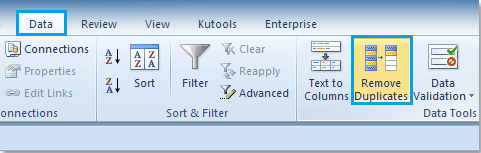
Remove same data in a list

To delete the same data that is contained within a database , use the procedure shown left.
comments | | Read More...

Linear Equations

Today, try solving a system of linear equations using matrix operations for it, from the formulas.

We used MINVERSE function, which we get the inverse matrix and MMULT function, obtaining with it the result of multiplying two matrices.
comments | | Read More...

Solver - Solving Linear Equations

By: Unknown on Saturday, 27 December 2014 | 05:01

Saturday, 27 December 2014

Linear equations are the most algebraic expressions used in different fields of science, from engineering through the science of human behavior to reach medical areas . 

A linear equation receives this name because when we get on a plane to graph results in the graph of a straight line. 

We linear equations with two or more variables the representation of these equations can be: 
  • Two variables -      3x + 2y = 8 
  • Three variables -   3x - 5y + 6z = -10 
  • Four variables -     w - 9x + 5y - 8z = -15


To solve a system of linear equations, we need to have the same number of equations and variables, that is, if I have a system of two variables , I need two equations to solve , if I have three variables , I need three equations and so on.
comments | | Read More...

Excel no longer expects

By: Unknown on Friday, 26 December 2014 | 08:39

Friday, 26 December 2014

This is a very stupid thing. Suddenly no longer expects Excel , when you type something .
Probable Cause: The automatic calculation has been turned off .

Remedy:

A) Up Excel 2003
About menu Tools -> Options - > Up tab Calculation - there select Automatic

B) From Excel 2007 Version 1:

Top left clicking on the Excel button in the dialog below right click Excel Options .
Select it, the following dialog formulas left .
Then select Automatic right in workbook calculation.

Version 2:
In the ribbon, select the tab formulas.
Click Turn right calculation options .
Then tick Automatic.

Possible causes:

1. accidentally changed itself
2. Irdenein Dödel has disconnected them about these macros and forget to turn
3. Other ...
comments | | Read More...

Disappeared scrollbars

By: Unknown on Thursday, 25 December 2014 | 02:33

Thursday, 25 December 2014

This is a very stupid thing. Suddenly no longer expects Excel when you type. 

Probable cause: The automatic calculation has been turned off. Remedy: A) Up Excel 2003 About menu Tools -> Options -> Up tab Calculation - there select Automatic B) From Excel 2007 

Version 1 : Top left clicking on the Excel button in the dialog at the bottom right click Excel Options. Select it, the following dialog left formulas. Then select Automatic right in workbook calculation.

Option 2: Select In the Ribbon tab formulas. click Turn right calculation options. 
Then automatically hook. Possible causes: first Even accidentally changed . 2 Irdenein Dödel have them switched off and on again forget about these macros . 3 Other ... 
comments | | Read More...

Disappeared scrollbars

You can no longer on the spreadsheet up and down or left and right with the scroll bar to move, because that's just gone at once. Gone - vanished into thin air - Fort as nothing ... Remedy: A) Up Excel 2003About the Tools menu - there select the bottom right horizontal and vertical scroll bars -> Options -> Top View tab. B) From Excel 2007 links at the top of the Excel button click, then in the dialog at the bottom right click Excel Options. Select it, the following dialog left Advanced. Then right as far down until youshow options for this workbook see. each set below this heading horizontal and vertical scroll bars a check mark. 
comments | | Read More...

Download

Blog Archive

 
Contact Us | Privacy policy | Term of use | Advertise with Us | Site map
Copyright © 2011. Blogging Brain . All Rights Reserved.
Design Template by Blogging Brain | | Powered by Blogger